Mass and count
Track particulate mass from PM0.1–PM10 and size-resolved particle counts from PC0.1–PC10.
PM/PC 0.1 | 0.3 | 0.5 | 1.0 | 2.5 | 5.0 | 10.0

Flair indoor air quality monitor
Flair brings particles, gases, comfort conditions, health context, alerts, reporting, and building automation into one configurable indoor air quality platform.

Flair for every decision-maker
Start with the outcome that matters to you. Flair keeps the experience simple for occupants and decision-makers while preserving the detail facilities, engineering, and IT teams need.
Bring building conditions into one clear operational view.
Healthier spaces · risk visibility · reporting Facility teamsSee issues sooner and verify what fixed them.Follow changing readings from the first alert to the response.
Alerts · trends · remediation · maintenance Engineering + BASBring air data into building operations.Connect measurements to supported building systems.
BACnet · Modbus · MQTT · API IT + securityDeploy with enterprise network controls.Align connectivity and access with project requirements.
802.1X · local options · updates · logs Health + sustainabilityConnect measured conditions to well-being goals.Turn air readings into context your team can use.
Health Index · standards · documentation Data centersWatch particles and corrosive-gas indicators.Configure sensing and reporting for critical environments.
H₂S | SO₂ | PM + PC | Local Server Consultants + procurementMove from evaluation to specification faster.Review evidence for project fit and green-building goals.
Specs · certificates · lab evidence · support Green Building CertificationSupport prerequisites and credits toward building certification.Plan the measurements and documentation your project requires.
WELL | LEED | RESETCertification depends on the project's sensors, installation, calibration, reporting, and program requirements.
A wider field of view
Flair can bring the measurements that matter to your environment into one understandable view. The sensor package is configured around the application, so teams are not limited to a fixed, one-size-fits-all monitor.
Track particulate mass from PM0.1–PM10 and size-resolved particle counts from PC0.1–PC10.
PM/PC 0.1 | 0.3 | 0.5 | 1.0 | 2.5 | 5.0 | 10.0Monitor ventilation, combustion, chemical, and application-specific gas indicators.
CO₂ · TVOC · CO · O₃ · NO₂ · SO₂ · NH₃ · H₂SUnderstand temperature, humidity, pressure, and calculated dew point alongside pollutant measurements.
Temperature · RH · air pressure · dew pointUse combined indices, thresholds, trends, and guidance to make the data easier to act on.
Overall · Mold · Vape · THC · Health IndexA closer look at particles
Mass concentration
PM measures the mass, or weight, of particles in the air. Small submicron particles in the 0.1-0.3 µm range have very little mass individually, so large numbers can be present without a substantial increase in the PM reading.
Particle-number concentration
PC measures the number of individual particles in the air and profiles them by size, including small submicron particles in the 0.1-0.3 µm range. It reveals particle counts that PM mass measurements alone cannot show.
What Flair can monitor
Explore particles, gases, comfort conditions, and interpreted indices.
Health Index organizes measured conditions into an overall indoor-air summary, six health-oriented views, and practical suggestions for building teams. However, it communicates environmental context, not a medical diagnosis.

PM measures the mass, or weight, of particles in the air. Small submicron particles in the 0.1-0.3 µm range have very little mass individually, so large numbers can be present without a substantial increase in the PM reading.
PC measures the number of individual particles in the air and profiles them by size, including small submicron particles in the 0.1-0.3 µm range. It reveals particle counts that PM mass measurements alone cannot show.
CO₂ commonly rises as people occupy a space. As a result, its trends help facility teams evaluate ventilation performance, occupancy patterns, and whether outdoor-air delivery is keeping pace with the way a room is used.
Total volatile organic compounds provide an overall signal for changing chemical emissions. For example, sources include cleaning products, finishes, furnishings, equipment, and personal-care products.
Carbon monoxide can be produced by incomplete combustion. Continuous visibility can support investigation of vehicle exhaust, fuel-burning equipment, infiltration, and other project-specific sources.
Ozone can enter from outdoors or be generated by certain equipment. Therefore, tracking it helps teams evaluate outdoor-air events, indoor sources, and conditions that may irritate the respiratory system.
NO₂ is associated with combustion sources such as traffic and gas-burning equipment. Monitoring can help distinguish outdoor infiltration from indoor combustion-related patterns.
SO₂ can be associated with fossil-fuel combustion and industrial sources. For these applications, a configured sensor can help specialized facilities and sensitive environments watch for changes over time.
Ammonia monitoring can support applications involving cleaning chemicals, refrigeration, agriculture, laboratories, waste handling, or other process-specific sources.
H₂S is a corrosive-gas indicator relevant to data centers, wastewater, industrial, and other sensitive applications. In addition, trends and alerts can be integrated into the facility response workflow.
Formaldehyde can be emitted by pressed-wood products, finishes, furnishings, and some processes. For projects that need a dedicated HCHO signal, optional monitoring provides that view.
Project-dependent sensor options can include methane, oxygen, hydrogen, phosphine, and ethylene oxide. ThinkLite selects the sensor package, range, and workflow for the use case.
Temperature affects comfort, productivity, equipment, and how occupants perceive air quality. Together, temperature and pollutant data make trends easier to interpret.
Relative humidity influences comfort, static, condensation, and mold-supporting conditions. Flair can pair RH with temperature, particle, and gas trends to give teams better context.
Barometric pressure adds environmental context and can support trend interpretation, specialty applications, and comparison of conditions across changing weather patterns.
Dew point is the temperature at which moisture can begin to condense. Indoor dew point is calculated from temperature and relative humidity; outdoor dew point comes from the connected weather data. Together, the two views help you understand moisture conditions when reviewing ventilation and condensation risk.
Configured indices turn multiple signals into a clearer status for the intended use case. They can support at-a-glance awareness, event review, thresholds, and follow-up—without replacing professional investigation or diagnosis.
Sensor availability, detection range, and simultaneous measurement depend on the selected capsule configuration. Optional and specialty sensors are configured for the application.
Indoor measurements. Outdoor perspective.
What happens outside can help explain what changes inside. Flair pairs indoor readings with data from the nearest available outdoor weather and air-quality stations, giving your team more context for ventilation, filtration, and comfort decisions.
Follow particles, configured gases, temperature, humidity, and air pressure where people work and gather—with calculated indoor dew point for added moisture context.
Explore indoor measurementsBring nearby outdoor air-quality and weather information into the comparison, where available.
Bring the room, the duct, and outdoor conditions into your ventilation decisions. Pair indoor Flair readings with In-Duct Flair measurements and outdoor data to support a more informed building management system (BMS) strategy.
Compare occupied-room readings with in-duct conditions to understand what the HVAC system delivers.
Review outdoor pollution, temperature, humidity, and dew point alongside indoor trends.
Inform ventilation and damper strategies when wildfire smoke, smog, or other outdoor conditions change.
Flair supplies data through supported integrations; the BMS controls equipment under the site's configured ventilation and safety requirements. Integration and control strategies are project dependent.
Two sources. One informed view. Indoor readings come from the configured Flair device; outdoor information comes from external services, not the indoor sensor. Available fields, station distance, and update times vary by location and provider. Nearby station data may differ from conditions directly outside your building. Outdoor AQI and Flair’s indoor indices use different methods and should not be treated as equivalent scores.
Designed for long-term use
Scroll to open Flair and see how the display, sensing, electronics, capsules, and enclosure come together. The modular design makes it easier to maintain accuracy, adapt the sensor package, and support the device over time.

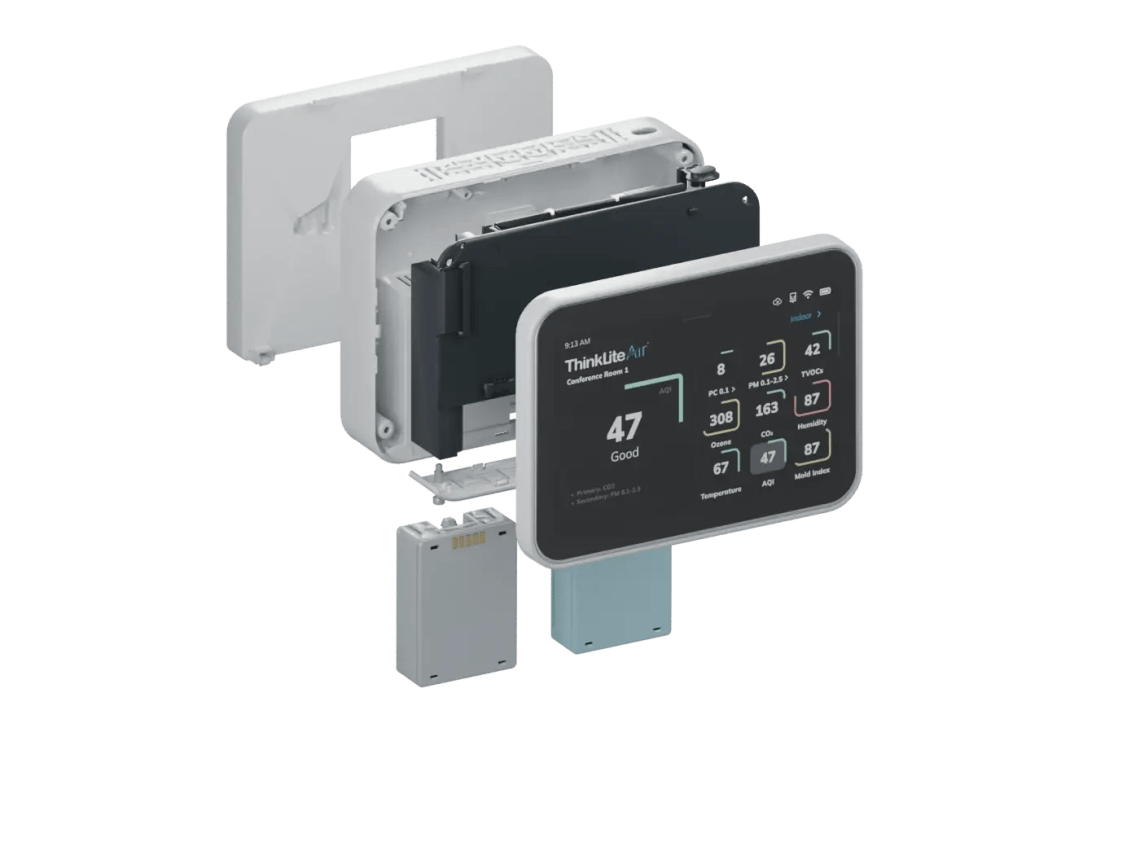
A serviceable architecture, replaceable capsules, and supported updates help Flair adapt as building needs change.

Selected real-time measurements and status remain visible in the space.

Modular internal assemblies support practical service and long-term use.

Capsule-level calibration and replacement reduce disruption at the installed device.
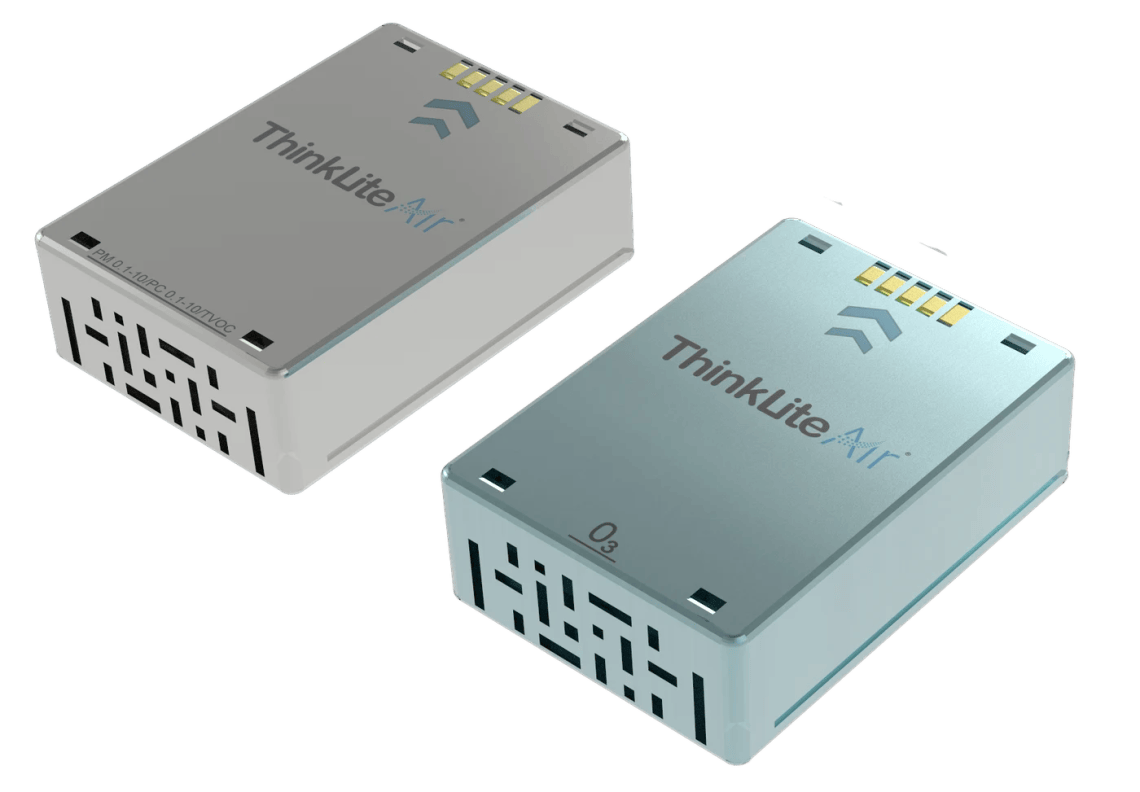
Capsule architecture
Instead of removing an entire monitor from service, the Flair capsule architecture supports a more convenient path: exchange, calibrate, and maintain the sensing layer while preserving the installed device and its network configuration.
Enterprise-ready security
Flair gives IT teams control over how devices connect, update, log activity, and operate within the building environment. To support those requirements, ThinkLite can align the deployment with client-specific network and security policies.
Request security documentationWi‑Fi, Ethernet, BACnet, Modbus, and MQTT connectivity options are disabled by default and enabled for the approved deployment.
Supported network options include 2.4 and 5 GHz Wi‑Fi plus WPA/WPA2 Enterprise and 802.1X methods including PEAP, TLS, TTLS, and PWD.
Automatic updates can deliver software, feature, security, and applicable CVE remediation as updates become available, subject to the client’s update policy.
General and administrator access levels, automatic screen locking, and USB Restricted Mode help limit unauthorized changes and accessories.
Syslog support can record selected device events and forward them to the client’s Syslog server for operational review.
Use ThinkLite cloud services or supported local-server options, with workflows configured around enterprise and project requirements.
Configured around the client
From measurement to response
Capture particles, gases, and conditions continuously.
Organize the readings into trends, indices, and context.
Notify the right people when a threshold or pattern changes.
Translate conditions into practical remediation guidance.
Share data with BAS/BMS and connected systems.
Use trends and reports to confirm the response worked.
Why Flair leads
Flair combines measurement depth, serviceable hardware, operational software, open integration, and flexible deployment in one platform. Together, these capabilities reduce blind spots and make long-term ownership more practical.
Airlytics®
Monitor real-time conditions, compare spaces, review trends, export data, schedule reports, configure alerts, and organize portfolios from site to enterprise level.

Health Index
Flair’s Health Index organizes measured conditions into an overall summary and six health-oriented views, paired with suggestions for building teams.
Watch the Health Index dashboard tour
Open by design
Bring measured conditions into automation, analytics, and enterprise workflows using supported open protocols.
Integration availability is configuration and project dependent.
Flair for data centers
Data centers need more than occupant-comfort metrics. Flair can be configured to watch particulate contamination and corrosive-gas indicators—including hydrogen sulfide (H₂S)—while feeding trends and alerts into facility workflows.
ASHRAE identifies airborne contaminants such as H₂S, SO₂, nitrogen oxides, chlorine, and ozone as potential risks to IT equipment. Flair configurations can help facility teams track selected environmental indicators alongside particles and comfort conditions.
Review the ASHRAE guidanceOne platform, multiple vantage points

In-room Flair
Wall mount, desktop stand, or kiosk configurations bring real-time visibility into occupied environments.

In-Duct Flair
Protected duct sampling adds the system-level context needed to investigate filtration, outside-air, and HVAC-side changes.
Explore In‑Duct FlairBuilt for real portfolios
ThinkLite Flair projects span education, hospitality, commercial offices, health-focused spaces, government, and critical environments. The examples below show the range of operating contexts the platform supports.
Select a Flair marker to explore the deployment footprint.
Flair monitoring across public areas, lobbies, meeting rooms, and conference spaces with enterprise network, local-server, and BMS requirements.
Continuous IAQ visibility supporting public spaces, facility response, comfort review, and mold-risk context.
Air-quality monitoring across institutional spaces with multi-building reporting and long-term operational needs.
Classroom and common-area visibility supporting facility response and more transparent learning environments.
A multi-monitor deployment supporting environmental awareness across classrooms and shared spaces.
Environmental monitoring supporting particle, gas, condition, and facility oversight in critical infrastructure.
Flair deployments across diverse college and university environments, from classrooms to gyms and public areas.
Monitoring deployments that help facility teams understand daily conditions across occupied spaces.
Site-wide monitoring combining Flair measurements, Airlytics visibility, reporting, and building integration.
Representative anonymized deployment patterns shown. Final configuration and project scope vary by site.
Where Flair is deployed
ThinkLite projects use Flair in occupied rooms, portfolios, critical facilities, and inside HVAC systems. The measurement package, installation type, connectivity, and reporting are matched to the application.
Classrooms, gyms, cafeterias, public areas, trends, alerts, and multi-building oversight.
Lobbies, meeting rooms, tenant reporting, enterprise security, and portfolio-wide visibility.
Configurable environmental monitoring for sensitive spaces and operations.
Guest-facing confidence, mold-risk context, facility response, and room-to-portfolio visibility.
Particles, corrosive-gas indicators, conditions, and independent connectivity.
Supply and return-air context for filtration, ventilation, outdoor air, and system performance.
Public-space transparency, facility response, reporting, and distributed-building oversight.
Project-specific gases, local integration, configurable thresholds, and process context.
Certifications + building standards
Bring clear measurements and traceable documentation to your building’s air-quality goals. Explore Flair’s monitor accreditation, the standards that guide your project, and the technical documents your team needs.
Flair monitor accreditation
Flair’s RESET listing covers PM2.5, CO₂, TVOC, temperature, and relative humidity. Review the independent directory entry for the accredited model and measurement scope.
View Flair’s RESET accreditationFlair’s RESET Grade B accreditation provides a monitor-performance pathway recognized in selected WELL and LEED v5 requirements. See how the pathways connect ↗
Explore the official guidance below to plan the measurements, reporting, and documentation your project requires.
Explore continuous-monitoring pathways for air quality and thermal comfort.
View WELL guidance ↗ Sustainable buildingsExplore the BD+C Air Quality Testing and Monitoring credit for new construction.
View v5 BD+C Testing & Monitoring ↗ Building performanceExplore indoor-air-quality management within building health and well-being.
Explore BREEAM ↗ Health-promoting spacesUnderstand air-quality testing, monitoring, and occupant-information requirements.
View Fitwel guidance ↗ Singapore green buildingsReview Singapore’s air-quality, comfort, and monitoring guidance for buildings.
Explore BCA Green Mark ↗ Environmental assessmentExplore indoor-environment assessment in Japan’s building-rating framework.
Explore CASBEE ↗A monitor supports the process. The project earns certification. These framework links are planning resources, not a claim that Flair holds each building certification. Compliance depends on the selected sensors, placement, calibration, reporting, performance, and the applicable version of each standard.
Request the reports and regional records that apply to your Flair configuration.
Request the test method, reference comparison, and results for technical review.
Request report ↓ Wireless + EMCRadio and electromagnetic-compliance documentation for the applicable product configuration.
Request documents ↓ Singapore radio registrationEquipment-registration documentation for Flair model TLIAQF2.0.
Request registration ↓ India radio approvalEquipment type-approval documentation for the specified model and radio bands.
Request approval ↓ Materials documentationRequest restricted-substance and chemical-compliance reports for technical review.
Request reports ↓ Battery + transportSafety and transport reports for the battery and cell in applicable Flair configurations.
Request reports ↓Specifying Flair in another market? Request regional documentation for your project →
CLAAS · Clean Air as a Service
CLAAS is ThinkLite’s service model for organizations that want the benefits of continuous indoor air-quality intelligence with a more convenient path for calibration, maintenance, reporting, and technology lifecycle support, tailored to the needs of each project.
Discuss a CLAAS programPlanned sensor service and capsule-level workflows.
Dashboard, reporting, alerts, and supported platform capabilities.
Support for applicable consumables and end-of-life sensing components.
A practical path for supported equipment and platform upgrades.
Technical overview
This overview combines multiple documented configurations. Final sensor set, ports, power input, ranges, accuracy, and regional features must be confirmed on the project-specific submittal.
Common questions
Need a configuration answer? The ThinkLite team can map the sensor capsule, connectivity, integrations, and service model to your project.
PM estimates particle mass in air, usually reported in µg/m³. PC counts particles in size channels. A cloud of very small particles can have a high count without contributing much mass, so the two views provide complementary context.
Flair’s PC0.1 channel begins at approximately 0.1 µm, or 100 nm, and provides particle-number visibility from 0.1–10 µm. Instruments such as CPCs or SMPS systems are used when a study must characterize particles below 100 nm.
No. Flair measures physical and chemical air-quality indicators; it does not identify biological species. Particle counts can help show that airborne particle conditions changed, but they cannot determine what a particle is.
Not necessarily. Instead, Flair is configured with sensor capsules selected for the application. The available measurements, ranges, and simultaneous channels depend on that project-specific configuration.
Flair pairs on-site indoor readings with data from the nearest available outdoor weather and air-quality stations through connected services. Outdoor fields can include SO₂, CO, NO₂, AQI, PM2.5, PM10, UV, dew point, temperature, humidity, and ozone. Availability and update times vary. Indoor dew point is calculated from temperature and relative humidity; the indoor monitor does not directly measure the outdoor air.
Supported options include BACnet, Modbus, MQTT, and REST API workflows. Flair can use Wi‑Fi, Ethernet, PoE, or optional 4G LTE connectivity, with cloud and supported local deployment options.
Flair’s replaceable capsule architecture is designed to make sensor service more convenient. ThinkLite can support remote or local workflows, capsule exchange, calibration, and end-of-life sensor replacement according to the selected service plan.
Clean Air as a Service is a configurable service model that can include software capabilities, reporting and alerts, sensor calibration and maintenance, applicable replacements or renewables, and supported equipment upgrades. In each case, the final scope is defined for the project.
Flair can automatically download and install supported software, feature, security, and applicable vulnerability-remediation updates as they become available. However, automatic updating can be aligned with the client’s internal update policy.
Supported local or on-premises deployment options are available for enterprise and security-sensitive projects. Final architecture depends on the configuration and integration requirements.
Build your Flair configuration
Tell us where Flair will be deployed. We’ll send the product information and help align the measurement package, connectivity, integration, and service approach to your project.
Your information is submitted through Pipedrive. ThinkLite will use it to respond to your document request and project inquiry.
© 2026 — ThinkLite. All Right Reserved.